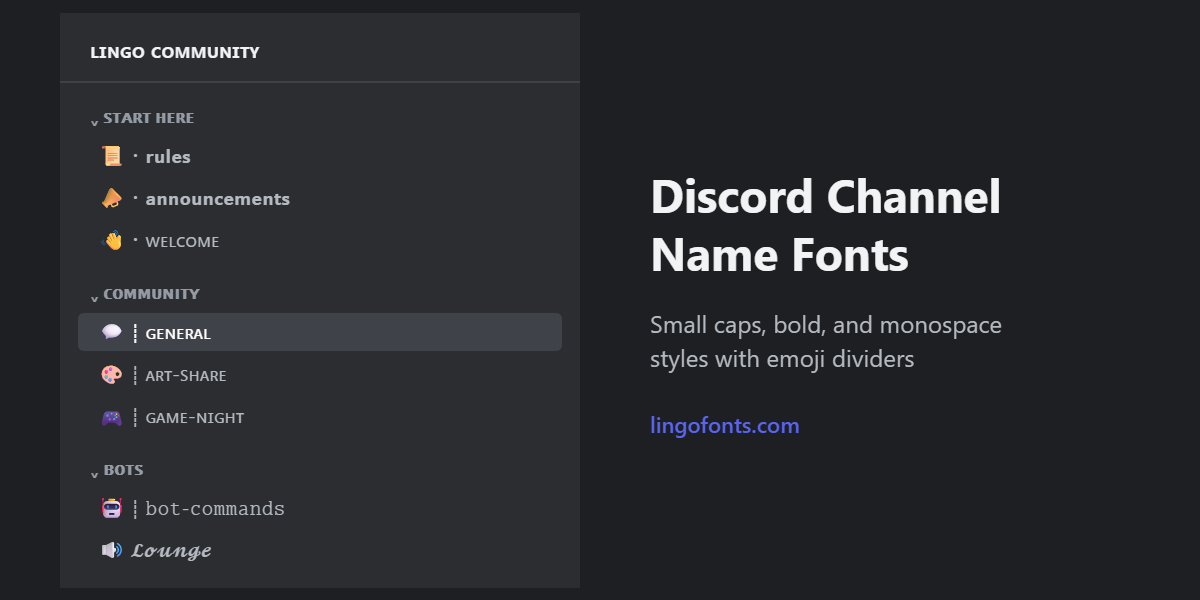
Discord channel name fonts are the fastest way to give a server its own look without bots or Nitro. They are Unicode characters that look like styled letters, so you paste them straight into the channel name field. The catch is that Discord treats channel names differently from usernames and messages, so some styles survive and others get changed when you save. This guide covers which 10 styles work, where you can use them in a server, and how to keep channels easy to find.
If you want styled text for your own profile rather than Discord channel name fonts, nickname, or messages, read our Discord font generator guide first. This article is for server owners and mods styling the server itself. You can make every style below in the Discord Font Generator.

Where You Can Use Fonts in a Discord Server
Most server fields accept Discord server fonts made from Unicode, but they do not all behave the same way:
| Field | Accepts styled fonts? | What to know |
|---|---|---|
| Server name | Yes | Shown in the server list tooltip and invites. Keep the first word plain so people recognize it in search. |
| Category | Yes | Discord displays category names in capitals. Styled letters have no capital form to switch to, so they show as you typed them. |
| Text channel | Yes, with changes | Spaces become hyphens and plain letters are lowercased. Explained below. |
| Voice and stage channel | Yes | Spaces and capitals are kept, so you have the most freedom here. |
| Role | Yes | Styled role names show in member lists and on profiles. Keep mod and admin roles plain so members can mention and recognize them. |
| Server nickname | Yes | Up to 32 characters, set per server. Covered in detail in our guide. |
| Username | No | Usernames only allow plain lowercase letters, numbers, periods, and underscores. |
Why Text Channel Names Change After You Save
When you save a text channel, Discord formats the name: spaces turn into hyphens and plain capital letters become lowercase. That is why typing “General Chat” gives you “general-chat”.
Discord channel name fonts behave differently because of how Unicode defines them. Bold, monospace, script, double-struck, and Fraktur letters come from the Mathematical Alphanumeric Symbols block. They are separate characters with no uppercase-to-lowercase mapping, so lowercasing leaves them untouched. In practice that means:
- Styled capitals stay capitals, even in a text channel.
- Small caps are already lowercase characters, so they never change.
- Spaces still become hyphens. To separate words visually, use a symbol divider instead (see below).
The 10 Best Discord Channel Name Fonts
| Style | Sample | Best for | Readability |
|---|---|---|---|
| Small Caps | ɢᴇɴᴇʀᴀʟ-ᴄʜᴀᴛ | Soft, clean servers; the most popular aesthetic choice | High |
| Fullwidth | general-chat | Vaporwave, retro, chill servers | Medium |
| Sans-serif Bold | 𝗴𝗲𝗻𝗲𝗿𝗮𝗹-𝗰𝗵𝗮𝘁 | Rules, announcements, key channels | High |
| Sans-serif Bold Capitals | 𝗚𝗘𝗡𝗘𝗥𝗔𝗟-𝗖𝗛𝗔𝗧 | Category-style headers inside a text channel list | Medium |
| Monospace | 𝚐𝚎𝚗𝚎𝚛𝚊𝚕-𝚌𝚑𝚊𝚝 | Dev, bot, and tech servers | High |
| Bold Script | 𝓰𝓮𝓷𝓮𝓻𝓪𝓵-𝓬𝓱𝓪𝓽 | Roleplay, art, and community servers | Medium |
| Double-struck | 𝕘𝕖𝕟𝕖𝕣𝕒𝕝-𝕔𝕙𝕒𝕥 | Gaming and sports servers | Medium |
| Fraktur (Gothic) | 𝔤𝔢𝔫𝔢𝔯𝔞𝔩-𝔠𝔥𝔞𝔱 | Dark, horror, and metal servers | Low |
| Circled | ⓖⓔⓝⓔⓡⓐⓛ-ⓒⓗⓐⓣ | Playful and kids-friendly themes | Low |
| Italic Sans | 𝘨𝘦𝘯𝘦𝘳𝘢𝘭-𝘤𝘩𝘢𝘵 | Quotes, journals, and chill channels | Medium |
1. Small Caps
Sample: ɢᴇɴᴇʀᴀʟ-ᴄʜᴀᴛ
These letters are already lowercase forms, so Discord has nothing to change, which makes small caps the most reliable of all Discord channel name fonts. They read almost like plain text, which makes them the safest default for a whole server. Unicode has no small-cap x, so generators fall back to a regular x.
2. Fullwidth
Sample: general-chat
Built for East Asian text, so device support is excellent. Each letter is wide, which pushes long names past the sidebar width and cuts them off. Keep fullwidth names to one or two words.
3. Sans-serif Bold
Sample: 𝗴𝗲𝗻𝗲𝗿𝗮𝗹-𝗰𝗵𝗮𝘁
Heavy enough to mark the channels everyone should read, and the most readable of the bold Discord channel name fonts. Use it for a handful of channels only; when every channel is bold, none of them stand out.
4. Sans-serif Bold Capitals
Sample: 𝗚𝗘𝗡𝗘𝗥𝗔𝗟-𝗖𝗛𝗔𝗧
Capitals usually get lowercased in text channels, but these are symbol characters with no lowercase form in Unicode, so they stay in capitals. That makes them the only way to get an all-caps text channel. Use sparingly; all caps is harder to scan.
5. Monospace
Sample: 𝚐𝚎𝚗𝚎𝚛𝚊𝚕-𝚌𝚑𝚊𝚝
Fixed-width letters look like code, which suits bot-command and dev-log channels. It pairs naturally with the code blocks covered in our Discord text formatting cheat sheet.
6. Bold Script
Sample: 𝓰𝓮𝓷𝓮𝓻𝓪𝓵-𝓬𝓱𝓪𝓽
Elegant and consistent, since every letter comes from the same Unicode block. Long names get hard to read in a narrow sidebar, so keep it to short channel names.
7. Double-struck
Sample: 𝕘𝕖𝕟𝕖𝕣𝕒𝕝-𝕔𝕙𝕒𝕥
Hollow letters with a scoreboard feel, popular among gaming Discord server fonts. Lowercase double-struck letters all come from one block, so they render evenly; only some capitals are borrowed from another block.
8. Fraktur (Gothic)
Sample: 𝔤𝔢𝔫𝔢𝔯𝔞𝔩-𝔠𝔥𝔞𝔱
Strong atmosphere, weak readability. Keep it for a server name or a single themed channel, never for rules or support channels people need to find fast.
9. Circled
Sample: ⓖⓔⓝⓔⓡⓐⓛ-ⓒⓗⓐⓣ
Readable for a short word but crowded in longer names. Works well for one fun channel, like a games or memes room.
10. Italic Sans
Sample: 𝘨𝘦𝘯𝘦𝘳𝘢𝘭-𝘤𝘩𝘢𝘵
A light touch that signals a casual channel without shouting. Thin strokes lose contrast in light mode, so check it in both themes.
Dividers and Prefixes for Aesthetic Discord Channel Names
Aesthetic Discord channel names usually combine one font with a short prefix: an emoji, a symbol, and a divider before the name. Common dividers include ・, ┊, ︱, ⌇, and ╰. A typical pattern looks like this:
📜・𝗿𝘂𝗹𝗲𝘀
📣・𝗮𝗻𝗻𝗼𝘂𝗻𝗰𝗲𝗺𝗲𝗻𝘁𝘀
💬┊ɢᴇɴᴇʀᴀʟ
🎨┊ᴀʀᴛ-ꜱʜᴀʀᴇ
🎮┊ɢᴀᴍᴇ-ɴɪɢʜᴛ
🤖┊𝚋𝚘𝚝-𝚌𝚘𝚖𝚖𝚊𝚗𝚍𝚜
Three rules keep this looking intentional rather than cluttered:
- Pick one divider and use it with your Discord channel name fonts in every channel.
- Use at most two fonts: one for important channels, one for everything else.
- Put the emoji first. It gives each channel a visual anchor that is readable even when the font is not.
Some symbols are missing from older phones and show as boxes. If members report squares in the channel list, our guide to why fancy text looks like boxes explains the cause.
Keep Channels Findable and Accessible
Discord channel name fonts use different characters from plain letters. A member who types “rules” into the quick switcher may not find a channel named 𝗿𝘂𝗹𝗲𝘀, and screen readers may read styled names letter by letter or skip them. WebAIM has detailed guidance on how screen reader users experience text, and the same logic applies to a channel list.
- Keep the channels new members need first, like rules, welcome, and support, plain or in small caps.
- Save heavy Discord channel name fonts like Fraktur and circled letters for fun or themed channels.
- Mention channels in messages with #, not by typing the name; a channel mention always links correctly whatever the font.
For the difference between Unicode styles and real fonts, see Unicode text vs. real fonts. For softer styles beyond this list, try the Aesthetic Font Generator, and for bold channel headers, the Bold Text Generator.
Ready to style your server? Type your channel names once in the Discord Font Generator and copy the Discord channel name fonts that fit your theme.
Frequently Asked Questions
Can you use custom fonts in Discord channel names?
Not real font files, but Unicode text styles work. Copy a style from a font generator and paste it into the channel name field. Discord displays the characters in its own typeface.
Why did Discord change my channel name after I saved it?
Text channel names are formatted automatically: spaces become hyphens and plain capital letters become lowercase. Styled Unicode letters are not lowercased, but spaces are still replaced.
Do Discord channel name fonts need Nitro?
No. Unicode styles are plain text, so they work on any server without Nitro or bots. You only need permission to manage channels.
Why can’t members find my styled channels in search?
Styled letters are different characters from plain ones, so typing the plain name may not match. Keep key channels plain or use small caps, and add a recognizable emoji.
Can I use fonts in my Discord username?
No. Usernames only accept plain lowercase letters, numbers, periods, and underscores. Use styled text in your display name or server nickname instead.