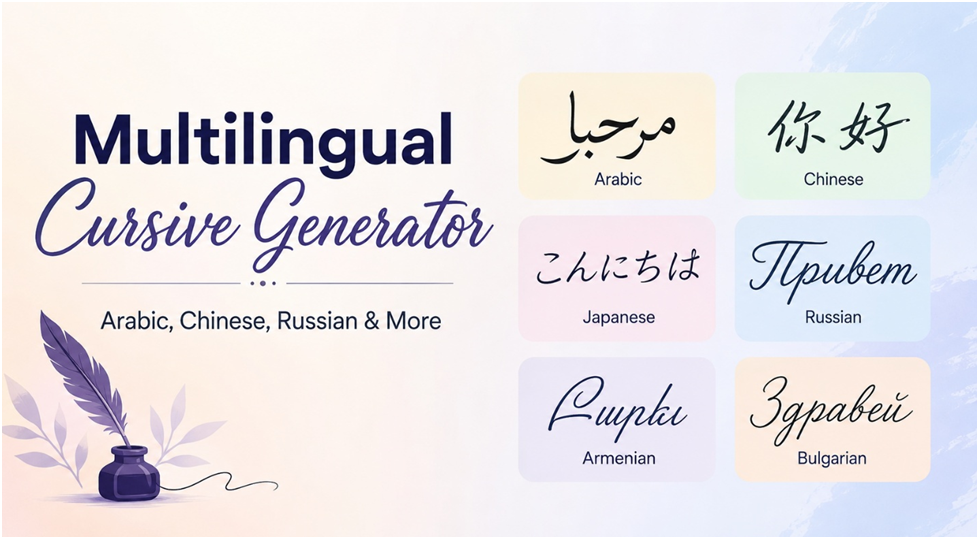
A multilingual cursive generator is meant to give you handwritten, joined-looking text in languages other than English. The honest answer to how that works is that it depends on the alphabet. For English and other Latin-alphabet languages, you can copy and paste cursive letters like 𝓑𝓸𝓷𝓳𝓸𝓾𝓻 straight into any app. For Arabic, Chinese, Japanese, Russian, Bulgarian and Armenian, copy and paste cursive does not exist, so you need a real script font instead. This guide explains why, and lists free fonts that give each language a genuine cursive or calligraphic look.
Why Copy and Paste Cursive Only Works for Latin Letters
Copy and paste cursive is made from the script alphabet in Unicode’s Mathematical Alphanumeric Symbols block. That block was created for mathematical notation, so it only contains the 26 basic Latin letters in upper and lower case. There is no script Arabic, Cyrillic, Chinese or Armenian in it, and there are no accented letters either. That has three practical consequences:
- English, Spanish, French, German and other Latin-alphabet languages can be converted, but accented letters such as é, ñ and ü stay plain.
- Text in any other alphabet passes through a cursive text generator unchanged.
- To get a cursive look in other alphabets, you must use a font that was designed for that script, either installed on your device or rendered as an image.
Our Cursive Generator handles the Latin-alphabet case, with Unicode styles to copy and real script fonts you can download as PNG images.
Cursive Fonts by Language
All of the fonts below are free and open source on Google Fonts, which means you can use them in Canva, Word, Google Docs or a website, and they include the characters for the script listed. We checked each one on Google Fonts in October 2026.
| Language | Script | Free fonts with a cursive or calligraphic feel |
|---|---|---|
| Arabic, Urdu, Persian | Arabic | Aref Ruqaa (Ruqʿah style), Amiri (Naskh), Reem Kufi (Kufic) |
| Russian, Bulgarian, Ukrainian | Cyrillic | Marck Script, Bad Script, Caveat, Lobster |
| Chinese | Han (simplified) | Ma Shan Zheng, Zhi Mang Xing, Liu Jian Mao Cao (grass script), Long Cang |
| Japanese | Kanji and kana | Yuji Syuku, Yuji Boku, Zen Kurenaido, Klee One |
| Armenian | Armenian | Few free script fonts exist; Noto Serif Armenian is the most reliable free option |
Arabic
Arabic is joined by nature: most letters connect to their neighbours in every handwriting style, so it is always “cursive”. What changes between fonts is the calligraphic tradition. Ruqʿah is the quick everyday handwriting style, Naskh is the clear book style, and Kufic is angular and geometric. Pick the one that matches the mood you want, and make sure your app supports right-to-left text.
Russian and Bulgarian (Cyrillic)
Russian handwriting is taught in cursive, and several letters look very different from print, for example the handwritten т looks like a Latin m. Script fonts such as Marck Script and Bad Script imitate this school handwriting. Bulgarian uses the same Cyrillic alphabet, though some Bulgarian lowercase letters are traditionally drawn differently, so check samples before choosing.
Chinese
Chinese calligraphy has its own cursive tradition. Running script (xíngshū) joins strokes for speed, and grass script (cǎoshū) is so abbreviated that it can be hard to read even for native readers. Liu Jian Mao Cao imitates grass script, while Ma Shan Zheng and Zhi Mang Xing give a brush-written look that stays readable.
Japanese
Japanese hiragana developed from cursive forms of Chinese characters, so a flowing look comes naturally. Yuji Syuku and Yuji Boku imitate brush calligraphy, Zen Kurenaido looks like felt-pen handwriting, and Klee One follows the letter shapes taught in school.
Armenian
Armenian has a strong calligraphic history, but very few free script fonts are available for it. For now, the practical options are installing a commercial Armenian script font or using a clean font such as Noto Serif Armenian and adding decoration around it.
How to Make Cursive Text in Another Language
- Pick a font for your script from the table above and open its Google Fonts page.
- For a design, add the font in Canva or download it and install it on your computer for Word and other apps.
- For social media, make your text in a design app, export it as an image and post the image.
- For English or other Latin-alphabet text, use the Cursive Generator to copy Unicode cursive directly.
For how each writing system handles joined handwriting in everyday life, read our companion guide to cursive in other languages. For background on handwriting itself, see what cursive writing is and cursive vs calligraphy.
Related guide: Fancy Text With Accents: Why é, ñ and ü Break (and How to Fix It).
Frequently Asked Questions
Is there a multilingual cursive generator for Arabic or Chinese?
Not for copy and paste text. Unicode only contains cursive versions of the basic Latin letters, so Arabic, Chinese and other scripts need a real script font, used in a design app or exported as an image.
Can I copy and paste cursive Russian letters?
No. There is no cursive Cyrillic alphabet in Unicode. Use a Cyrillic script font such as Marck Script or Bad Script in a design app instead.
Does a cursive generator work for French or Spanish?
Yes for most letters, because they use the Latin alphabet. Accented letters such as é, ñ and ü stay in the normal style because Unicode has no cursive versions of them.
Are these fonts free for commercial use?
Fonts on Google Fonts are open source, mostly under the SIL Open Font License, which allows commercial use in designs. You cannot sell the font files themselves.
Is Arabic always written in cursive?
In practice, yes. Most Arabic letters join to the letters next to them in both print and handwriting, so the script is cursive by design.