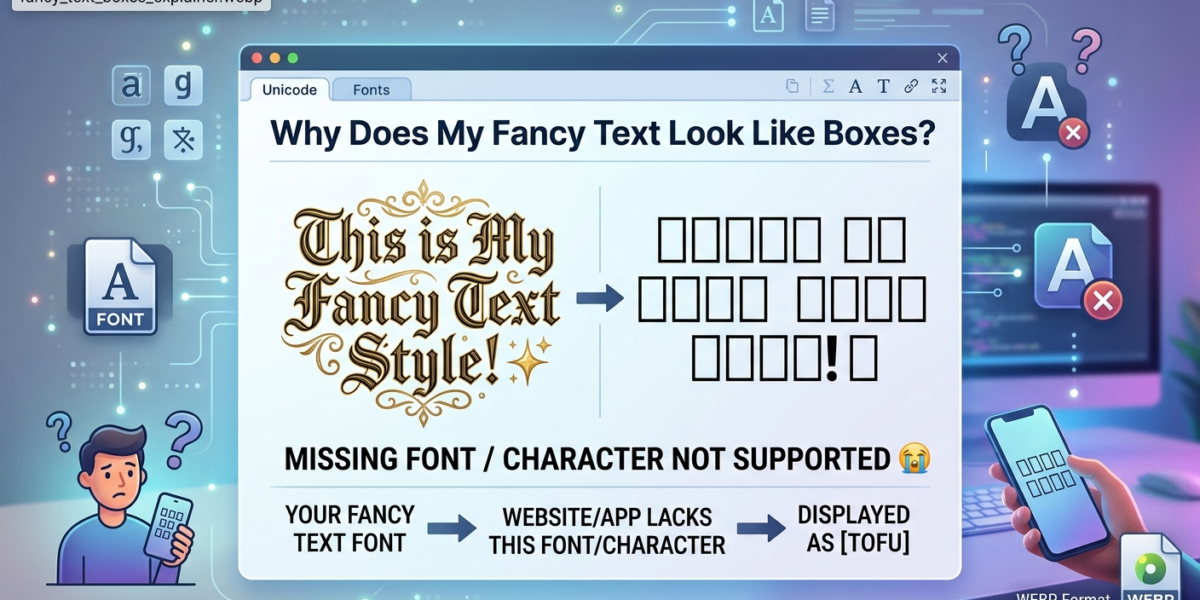
Fancy text looks like boxes on a friend’s screen even though it looked perfect on yours — you style your text with a bold, cursive, or aesthetic generator, it renders fine for you, and then someone replies “it’s just squares for me.” Nothing broke on your end. Here’s what’s actually happening, and which styles are safe to use anywhere.
Why Fancy Text Isn’t Really a “Font”
The stylized text you copy from a generator isn’t a font applied to normal letters — it’s made of entirely different Unicode characters, drawn from the character set maintained by the Unicode Consortium. The bold “𝐏” and a regular “P” are two separate characters, not one letter wearing a costume. This is exactly why fancy text looks like boxes on some devices: when you paste styled text, those specific characters travel with your message wherever it goes.
What Happens on the Reader’s Device
Every device keeps a set of installed fonts that map characters to glyphs — the actual little pictures you see on screen. When a device meets a character it has no glyph for, it draws a placeholder box instead, sometimes nicknamed “tofu.” This fallback behavior is well documented in the W3C’s guidance on font fallback, and it explains why fancy text looks like boxes for some readers even when it displays perfectly for you. It isn’t corrupted text, and it isn’t something you did wrong.
Which Styles Are Safest
Not all styles carry equal risk. The more widely a Unicode block is supported across devices, the safer it is to use in a bio, username, or message that strangers on different phones will read.
- Bold, Italic, and Bold Italic (the Mathematical Alphanumeric block) — the best supported styled text on the internet, safe almost everywhere
- Small Caps and Fullwidth — also very safe, widely shipped on both old and new devices
- Script/Cursive and Double-Struck — fine on most modern phones, but riskier on older Android devices and some desktop browsers
- Circled, Squared, and Fraktur/Gothic — the highest risk of showing as boxes on older or budget devices
How to Check Before You Post
If you’re posting somewhere your audience uses a real mix of devices — a Discord server, a public bio, a resume — preview the exact style before you commit to it. Ask a friend on a different phone or platform to confirm it displays correctly, especially if it’s going into a username you can’t easily change later.
Quick Fixes if Your Text Already Shows as Boxes
- Switch to a safer style — Bold or Small Caps instead of Script, Circled, or Fraktur
- Shorten the text — some apps truncate or mis-render long runs of styled Unicode
- Use a real-font PNG download instead of copy-paste, if the platform accepts images
Boxes, Question Marks, or Blank Spaces: What Each One Means
Not every broken character looks the same, and the symptom tells you where the problem is.
- Empty boxes (often called “tofu”) mean the reader’s device received the correct character but has no font that can draw it. The text itself is fine; the display is missing a glyph. Google even named its Noto font family after this problem: the goal was “no more tofu.”
- A diamond with a question mark (�) is the Unicode replacement character, U+FFFD. It appears when text was corrupted in transit, usually because bytes were decoded with the wrong encoding. That is a data problem, not a font problem, and installing fonts will not fix it.
- Plain question marks (?) usually mean a system converted your text into an older, limited character set that has no slot for the character, so it was replaced.
- Blank gaps can come from invisible characters such as zero-width spaces, or from a font that maps the character to an empty glyph.
Why Some Generators Produce Boxes Everywhere
Most bold, italic, and script styles come from the Mathematical Alphanumeric Symbols block (U+1D400 to U+1D7FF), added in Unicode 3.1 in 2001. That block has gaps: a few letters, such as script capital B (ℬ) and fraktur capital C (ℭ), had already been encoded years earlier in the Letterlike Symbols block, so their positions in the math block were left reserved and unassigned.
A careless generator that simply adds a fixed offset to every letter will land on those reserved positions. Because no character is assigned there, no font anywhere can draw it, and the reader sees a box on every device. A correctly built generator maps those letters to their older Letterlike Symbols equivalents instead. If one specific letter breaks in a style while the rest work, this is almost always the reason.
Where Styled Text Breaks Even When It Displays
Rendering is only half the story. Because styled letters are different characters, some things stop working even when the text looks perfect:
- Search and hashtags. “𝐟𝐨𝐨𝐝” and “food” are different strings, so a styled hashtag will not match the normal one, and styled words in a profile may not match what people type into search.
- Username and display-name fields. Many platforms restrict which characters these fields accept, so a style that works in a post can be rejected or stripped in a name.
- Copying into documents and forms. Spell-checkers, translation tools, and form validators usually treat styled letters as unknown symbols.
The practical rule: use styled text for decoration, and keep anything people need to find, search, or read aloud in plain letters.
Try It Yourself
Every generator on LingoFonts shows the live styled text before you copy it, so you can compare a few styles side by side and pick one you’re confident will hold up. Start with the Bold Text Generator, the Cursive Generator, or the aesthetic fonts generator.
Fancy Text Looks Like Boxes? The Quick Recap
If fancy text looks like boxes for someone reading your post, it almost always comes down to one thing: their device doesn’t have a glyph for that specific styled character, so it falls back to a placeholder square. It has nothing to do with your internet connection, your account, or a broken copy-paste. Stick to Bold, Italic, or Small Caps when you need something that holds up everywhere, save the riskier scripts and Fraktur styles for audiences you know are on modern devices, and you’ll rarely run into the problem at all.
To find styles that display on more devices, browse the Fancy Text Generator or our fancy text styles guide. Unicode Text vs. Real Fonts explains why some characters depend on the fonts installed on your device.
FAQ
Is this a bug in the generator?
No — it’s a normal limitation of Unicode font support on the reader’s device, not something a generator can fix from its end.
Will bold text ever show as boxes?
Rarely. Bold and italic Unicode styles have the widest device support of any styled text, making them the safest choice when you don’t know what devices your audience is using.
Does this affect screen readers too?
Sometimes. Some screen readers announce styled Unicode characters oddly or skip them entirely, so avoid fancy text for anything critical, like safety information or important instructions.