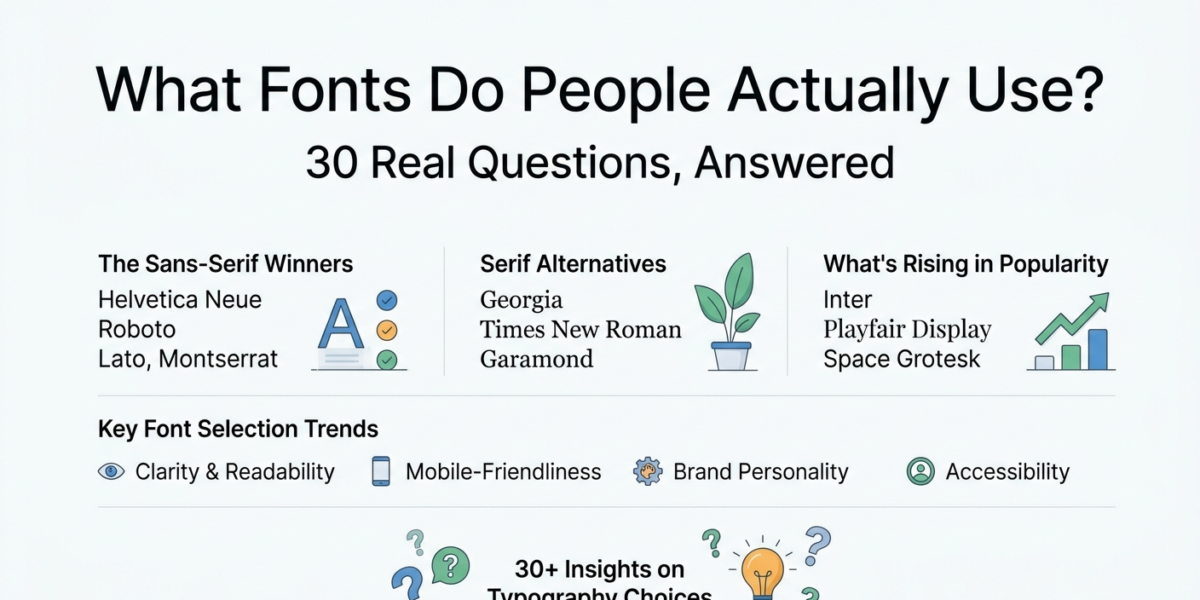
If you’ve ever searched for a font generator guide, you’ve probably run into the same handful of questions on every forum: what to write drafts in, what to put on a book cover, whether that free font is actually free, and — more often than you’d think — someone asking if there’s a site where you type a word and watch it turn into a dozen different styles instantly. There is. This roundup pulls together the questions people keep asking about fonts and font generators, grouped from the everyday (“what do you write in?”) to the more niche (font licensing, generators, and whether fonts can make you money), so you can skip the scrolling and get straight to the answers.
New to styled text? Our copy and paste fonts beginner’s guide explains how it works and which of our 12 generators to use.
Font Generator Guide: Turning Plain Text Into Something Else
The Fonts People Actually Reach For
What fonts do you like to write in? Most writers gravitate toward something quiet and legible — Georgia, Garamond, or a system serif — because a font that disappears into the background lets you focus on the words instead of the letterforms. Sans-serifs like Inter or Calibri are close seconds for people who draft on-screen rather than print.
Which fonts do you guys use? Ask a room of ten people this and you’ll get ten different answers, but there’s a pattern: writers lean serif, designers lean sans-serif, and everyone has one “weird” font they use just for fun — usually something handwritten or stylized for notes, social captions, or personal projects.
What fonts do you write your drafts in? For first drafts specifically, the advice is almost universal: pick something plain and get out of your own way. Times New Roman, Georgia, and Courier (for the old-school typewriter feel) show up constantly because none of them are interesting enough to distract you.
Matching Fonts to the Job
What fonts do you use for your user guides? Technical and user-facing documentation favors humanist sans-serifs — think Source Sans, Open Sans, or Segoe UI — because they render cleanly at small sizes on screens and hold up well in numbered steps and callout boxes.
What font do you use for your reports? Business reports skew conservative on purpose: Calibri and Arial dominate because they’re the safest defaults across Word, Google Docs, and PDF exports, but Georgia or Cambria is a common upgrade when someone wants a report to feel a little more considered without looking unusual.
What font should I use for my book? For the interior body text of a printed book, classic serifs like Garamond, Baskerville, or Caslon are the standard — they’re designed for long, comfortable reading. Covers are a different game entirely and usually built around a single bold display font that matches the genre.
What is some good fonts for cleaner scientific presentations? Lato, Source Sans Pro, and Roboto are common picks for scientific slides because they stay crisp when projected, handle numbers and Greek letters clearly, and don’t compete with charts and data for attention.
Need help with font choices that are more “zine”-esque than Arial: Zine aesthetics usually mean leaning into imperfection — think collage-style typewriter fonts, condensed grotesques, or hand-lettered display fonts mixed with a plain body font for contrast. The goal is texture and personality, which is the opposite of what a corporate default like Arial is built for.
When Fonts Cause Problems
Does anyone ever have trouble with your fonts? Yes, constantly — and it’s rarely the font itself. The usual culprits are fonts not embedding properly in exported PDFs, custom fonts not loading on certain devices or browsers, and copy-pasted “stylized” text turning into boxes or question marks when it lands somewhere that doesn’t support the underlying characters.
Is there a scientifically proven best font for reading? Not a single “best” one, but research consistently points to a few traits that matter more than the specific typeface: consistent letter spacing, clear distinction between similar letters (like “I,” “l,” and “1”), and appropriately sized x-heights. Studies on dyslexia-friendly fonts also show that spacing and weight consistency help more than any one design.
Embedding corporate fonts — yes or no? Generally yes, but check the license first. Most professional type foundries (and Adobe, Google, and Microsoft’s own libraries) explicitly allow embedding for documents and web use, but some licenses restrict embedding in editable formats or require a separate web-font license. When in doubt, the font’s EULA will say so directly.
How do you explain to a client why some fonts are better than others for their project? The easiest framing is function over taste: a font isn’t “better” in the abstract, it’s better or worse at a specific job. Show the client the same headline in two fonts at the sizes it will actually be used, and let readability, tone, and brand fit make the case instead of a subjective opinion.
Free Fonts Worth Knowing About
Best resource for 100% free fonts? Google Fonts remains the most reliable source since every font is fully open-license and safe for commercial use. Font Squirrel is a close second for the same reason — everything listed there has already been checked for commercial-use licensing, which saves you from digging through legal fine print yourself.
What are your top 5 free fonts? The recurring favorites across forums are Inter, Montserrat, Lora, Playfair Display, and Space Mono — one clean sans-serif, one geometric sans, one readable serif, one elegant display serif, and one monospace, which covers most everyday design needs.
Where can I find interesting free fonts? Beyond Google Fonts’ more expressive corners, DaFont and 1001 Fonts are popular for personality-heavy display fonts — just double-check each individual font’s license, since these sites host a mix of free, freemium, and donation-ware fonts. Where do I find fonts that look great and are actually unique? Unicode Consortium – Independent type foundries are the answer here — sites like Velvetyne (free and open-source) or paid foundries like Pangram Pangram tend to release fonts you won’t see on every third website, unlike the handful of ultra-popular free fonts that show up everywhere.
Where do I find fonts that look great and are actually unique? Unicode Consortium – Independent type foundries are the answer here — sites like Velvetyne (free and open-source) or paid foundries like Pangram Pangram tend to release fonts you won’t see on every third website, unlike the handful of ultra-popular free fonts that show up everywhere.
The 25 most popular fonts on the web, from a scan of the top million websites: Large-scale scans of live websites consistently turn up the same handful at the top: Arial, Helvetica, Roboto, Open Sans, and system-default sans-serifs dominate simply because they’re pre-installed or auto-loaded by page builders. It’s less a ranking of “best” fonts and more a snapshot of what ships by default.
Font Generators: Turning Plain Text Into Something Else
Are there sites where you can enter a word and have different fonts show up? Yes — this is exactly what Unicode-based font generators do. You type a word once and it instantly renders in dozens of styles (bold, cursive, aesthetic, bubble, and more) that you can copy and paste anywhere, since they’re built from special Unicode characters rather than actual font files.
Are there any good font generator/creation websites or programs? This font generator guide splits into two very different categories worth telling apart. There are two very different categories worth telling apart. Unicode text generators (like LingoFonts) let you type text and instantly get stylized versions you can paste into bios, captions, or usernames — no downloads or software needed. Font creation programs, on the other hand — like FontForge or Calligraphr — are for building actual installable typefaces from scratch, which is a much bigger undertaking.
Online font generator — very useful free tool for font generation: Agreed, and it’s one of the most common recommendations in font threads, which is exactly why this font generator guide leads with it. Browser-based Unicode generators solve the specific problem of “I want stylish text right now, without installing anything,” which is why they’re passed around so often.
Help finding a font generator? If the goal is stylized text for social media, Discord, or bios, this font generator guide points to one fast answer — a Unicode generator does the job in seconds. — LingoFonts covers cursive, calligraphy, aesthetic, bold, fancy, and platform-specific styles for Discord and TikTok in one place, so you’re not hunting across five different sites.
I need a font generator to implement in a WordPress blog: For that, you’d want either a plugin that loads custom web fonts (like Google Fonts for WordPress) if you’re styling site text, or a Unicode text tool if you want visitors to generate stylized text within a post or widget. They solve different problems, so it’s worth being clear on which one you actually need before picking a tool.
Online font family generator? If this means generating stylized text variations, that’s the Unicode-generator category again. If it means building a coordinated family of weights and styles for a brand, that’s a type-design tool like Glyphs or FontForge — a much more involved process meant for designers, not a quick web tool.
How do you create a text font? Real font creation involves drawing or digitizing glyphs for every character, spacing them consistently (kerning), and exporting to a format like TTF or OTF using software such as FontForge, Glyphs, or Calligraphr (which can even generate a font from your own handwriting). It’s a genuinely technical process, distinct from typing text into a stylizer.
Someone recreated a popular handwriting-style font and made a generator where you can type anything: This is a well-worn (and popular) project idea — turning a distinctive handwriting or brand style into a typeable generator. It usually works by mapping each letter to a custom glyph or Unicode character so any word you type comes out in that style automatically.
A fancy font art generator someone built and shared: These “showoff” style generators are usually small Unicode or canvas-based tools, and they’re a good reminder of how low the barrier is to build one — the same underlying idea, at a larger scale, is what tools like LingoFonts run on.
A website that makes any text stylish anywhere online using Unicode: This describes the Unicode-generator model exactly, and it’s the reason these tools work in places actual custom fonts can’t reach — bios, usernames, comments, and chat apps that don’t support font uploads but do support Unicode characters. LingoFonts is built on this principle across its Aesthetic, Bold, Cursive, and Fancy generators.
Does anyone know a font AI generator that uses text prompts and creates a TTF? This is a newer and much less common category — most tools that let you “type a prompt and get a font” are still experimental, and true TTF creation from a prompt (rather than handwriting samples or manual drawing) isn’t yet standard. It’s worth separating from Unicode stylizers, which don’t produce font files at all — they just substitute characters.
Best font generation programs? For real typeface creation: FontForge (free, open-source) and Glyphs (paid, Mac-only) are the most recommended. For instant stylized text with zero install, Unicode-based web generators are the faster, simpler option for anyone who doesn’t need an actual font file.
That covers the core of any font generator guide: what people actually reach for, where they get stuck, and which tools solve the “I need this right now” problem. The last question worth answering is a different kind entirely — whether any of this can pay for itself.
Fonts as a Business
Are fonts a good source of passive income? For type designers, yes — marketplaces like Creative Market and MyFonts let independent designers sell licenses on an ongoing basis, and a well-marketed font family can keep generating sales years after release. It’s a real niche, but like most passive income, the “passive” part comes after a lot of upfront design and marketing work.
If you came here specifically for the “type a word, get instant stylish text” font generator mentioned throughout this font generator guide, that’s what LingoFonts.com is built for — no downloads, no font files, just paste-ready stylized text for bios, captions, and usernames.
To try these styles yourself, start with the Cursive Generator or the Fancy Text Generator. If a style shows up as empty boxes, read why fancy text looks like boxes, and for the difference between copy-and-paste styles and installed fonts, see Unicode Text vs. Real Fonts.