
Discord text formatting works by wrapping words in symbols: type **like this** and Discord shows it in bold. It’s built on Markdown, a plain-text formatting system, and it works in messages on desktop, web and mobile without Nitro.
This guide covers the 12 formatting tricks Discord supports, how to combine them, why formatting sometimes fails, and the one place Markdown can’t reach: your name. For display names, nicknames and server names you need Unicode fonts instead, which is what the Discord Font Generator is for.
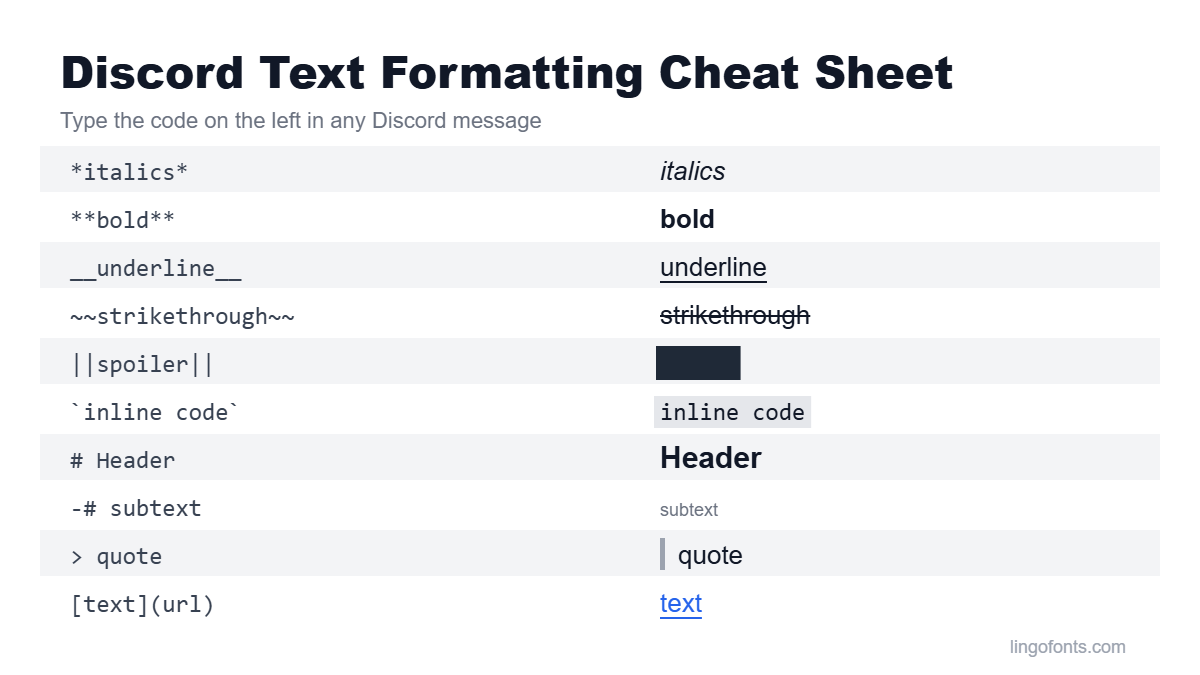
Discord Text Formatting Cheat Sheet
Every code below comes from Discord’s own Markdown Text 101 help article. Type the code exactly as shown, including the spaces where noted.
| Style | Type this | Where it works |
|---|---|---|
| Italics | *text* or _text_ | Anywhere in a message |
| Bold | **text** | Anywhere in a message |
| Underline | __text__ | Anywhere in a message |
| Strikethrough | ~~text~~ | Anywhere in a message |
| Spoiler | ||text|| or /spoiler | Anywhere in a message |
| Inline code | `text` | Anywhere in a message |
| Code block | ```text``` | Can span several lines |
| Block quote | > text or >>> text | Start of a line |
| Headers | # , ## or ### | Start of a line |
| Subtext | -# text | Start of a line |
| Masked link | [text](https://example.com) | Anywhere in a message |
| Lists | - , * or 1. | Start of a line |
The 12 Formatting Tricks Explained
1. Italics
Wrap text in one asterisk or one underscore: *really* or _really_. Use it for light emphasis, titles of games and shows, or a tone of voice.
2. Bold
Two asterisks on each side: **read the rules**. Bold is the strongest emphasis in chat, so save it for the one thing people must not miss.
3. Underline
Two underscores: __text__. This is specific to Discord. In standard Markdown, used by Reddit and GitHub, double underscores mean bold, so formatting copied between apps can change meaning.
4. Strikethrough
Two tildes: ~~old plan~~. Useful for corrections and jokes; one tilde on each side does nothing.
5. Spoilers
Two vertical bars on each side, ||the ending||, hide text until someone clicks or taps it. You can also start a message with the /spoiler command.
6. Inline code
Single backticks, `/help`, show text in a monospace box. It’s the clearest way to show a command or setting name, and nothing inside it gets formatted.
7. Code blocks and syntax highlighting
Three backticks on each side create a multi-line block. Add a language name right after the opening backticks to color the code:
```js
console.log('hello');
```
Syntax highlighting is designed for code. Its colors may look different, or not appear at all, depending on the app and device you view it on.
8. Block quotes
Start a line with > to quote a single line, or >>> to quote everything from there to the end of the message. Leave a space after the symbols.
9. Headers
Start a line with # , ## or ### for large, medium and small headings. Discord supports three header sizes. They work well for announcements and rules posts and look out of place in normal conversation.
10. Subtext
Start a line with -# to make it small and muted. It suits footnotes, credits, or “edited for clarity” notes under an announcement.
11. Masked links
Put the text in square brackets and the URL in parentheses: [server rules](https://example.com). The text becomes clickable instead of showing a long raw URL.
12. Lists
Start lines with - or * for bullets, or 1. for numbers. Indent a line with a space before the dash to nest it under the line above.
Combining Discord Text Formatting Styles
Discord lets you stack styles. Close them in the reverse order you opened them, or the formatting breaks:
***text***: bold italics__*text*__: underlined italics__**text**__: underlined bold~~**text**~~: bold with a strikethrough||**text**||: a bold spoiler
Why Your Discord Text Formatting Isn’t Working
- The symbols aren’t balanced.
**bold*won’t render; every opening set needs a matching closing set. - Line-start formats aren’t at the start. Headers, subtext, quotes and lists only work when the symbol is the first thing on the line, followed by a space.
- It’s inside a code block. Code formatting disables Markdown for everything inside it.
- There’s a backslash. A
\before a symbol tells Discord to show it literally. That’s also how you type a real asterisk:\*not italic\*. - You’re editing your name. Markdown only formats messages. Names need Unicode fonts (see below).
Markdown vs. Unicode Fonts: Which One to Use
Markdown and Unicode fonts look similar but work in completely different ways.
- Markdown is formatting instructions. Discord reads the symbols and draws the style, so it only works in places Discord formats: messages, and only inside Discord. Copy a formatted message into another app and you get either the raw symbols or plain, unstyled text.
- Unicode fonts are different characters that already look bold, script or gothic, such as 𝐛𝐨𝐥𝐝 or 𝔤𝔬𝔱𝔥𝔦𝔠. Because they are characters rather than formatting, they work in display names, server nicknames, server names, role names and your About Me, where Markdown does nothing.
The two also combine: a spoiler or quote can contain Unicode text. For names, use the Discord Font Generator or the Bold Text Generator. For upside-down text, the Upside Down Text Generator works the same way.
Two cautions with Unicode fonts. They can’t be used in your username itself, which Discord limits to plain letters, numbers, periods and underscores; the Discord font guide covers where they do work. And some styles show as empty boxes on older devices, explained in why fancy text looks like boxes.
Discord Text Formatting Tips for Announcements
- Use one
#header per announcement, not several. - Bold the single most important line, such as a date or a rule.
- Put links behind masked text so the message stays readable.
- Use
-#subtext for credits and fine print. - Keep critical information in plain text or Markdown, not Unicode fonts, so screen readers can read it.
Frequently Asked Questions
Does Discord text formatting work on mobile?
Yes. Markdown formatting works in messages on the desktop, web and mobile apps. Some extras, such as syntax highlighting colors in code blocks, may look different or not appear depending on the device.
Do I need Nitro to format text on Discord?
No. All Markdown formatting, including headers, subtext and spoilers, is free for every account.
Can I use bold or italic text in my Discord name?
Not with Markdown, which only formats messages. Unicode fonts work in display names and server nicknames because they are characters rather than formatting. Usernames only allow plain letters, numbers, periods and underscores.
How do I type an asterisk without making text italic?
Put a backslash before it, like \*this\*, or place the text inside backticks so it shows as code.
Is there a way to change text color on Discord?
Discord has no official text color option. Code-block syntax highlighting adds color to code, but it isn’t reliable for normal messages and can look different on different devices.
Style your Discord name with the free Discord Font Generator →