Choosing calligraphy fonts for wedding invitations comes down to one question most guides skip: is this text going to be printed, or typed? Printed stationery needs a real font exported as an image. Text you paste into a wedding website, a WhatsApp invite or an Instagram announcement needs Unicode characters instead. Pick the wrong one and you get blurry names on your invitations, or hashtags that don’t link.
This guide covers both routes using the free Calligraphy Font Generator, which offers 28 real calligraphy fonts (downloadable as PNG) and 34 Unicode styles (copy and paste). You’ll see which fonts suit which kind of wedding, how to match lettering to each piece of stationery, and the readability mistakes that make guests squint.
Printed vs. Digital: Two Kinds of Wedding Calligraphy
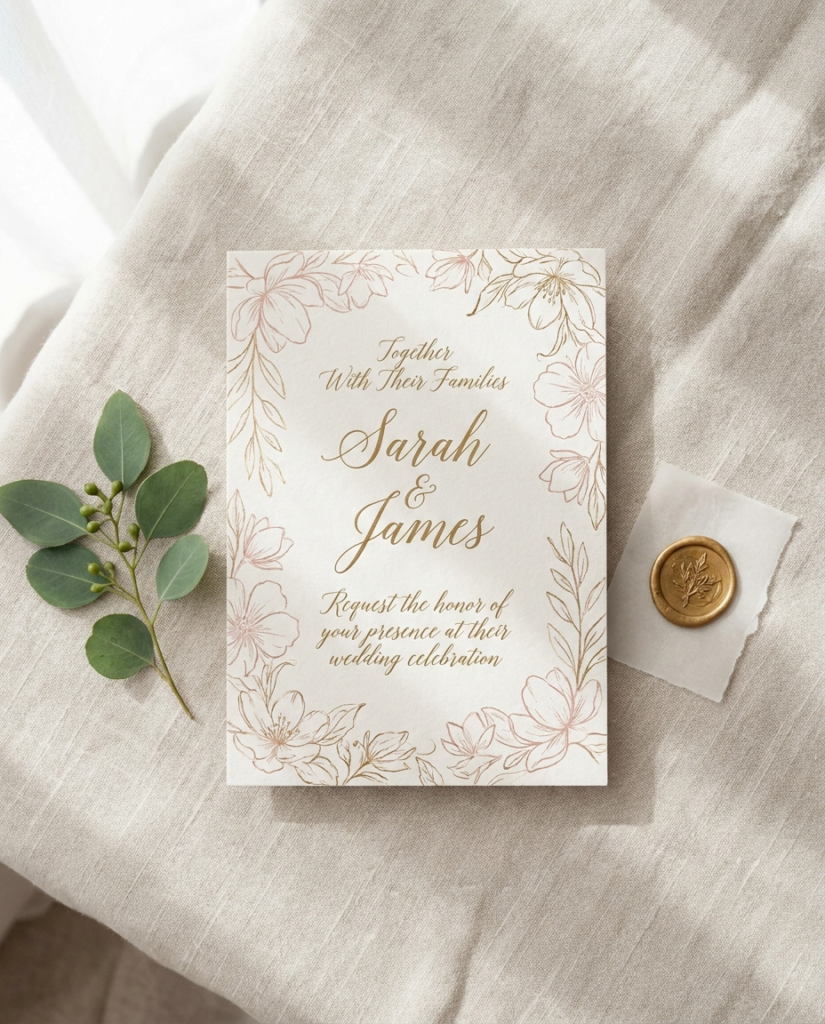
For anything printed (invitations, save-the-date cards, place cards, signage), use the real Google Fonts in the generator and download the result as a PNG. These are genuine typefaces with proper calligraphic strokes, so they hold up on paper. You then place the image into Canva, Word or whatever tool your printer works from.
For anything typed (wedding website headings, Instagram captions, WhatsApp invitations, Facebook event titles), use the Unicode styles. They aren’t really fonts: they’re special characters from the Unicode standard that look like script letters and paste anywhere plain text is accepted.
Most couples need both: real fonts for the paper suite and Unicode for the online announcements that go with it.
Need individual letters for place cards or a monogram? Our calligraphy alphabet page has six complete A to Z sets you can copy and paste.
The Best Calligraphy Fonts for Wedding Invitations
All of these are among the 28 calligraphy fonts in the generator. They are grouped by the mood they create, which matters more than any single “best” pick.
Formal and Classic: Pinyon Script, Petit Formal Script
Pinyon Script follows the slanted, high-contrast shapes of traditional copperplate penmanship, which makes it the closest match to engraved invitations for a church, ballroom or black-tie wedding. Petit Formal Script is in the same family of styles but with simpler, more open letters, so it stays legible on small cards.
Romantic and Flowing: Great Vibes, Allura, Alex Brush
These have long, looping capitals that look best when they have room to breathe. Use them for the couple’s names on the main invitation or a welcome sign, not for a full paragraph. Alex Brush has a slightly brush-pen texture that suits garden and outdoor weddings.
Light and Elegant: Tangerine, Parisienne, Niconne
Lighter scripts that keep long names on a single line. Tangerine is tall and condensed; Parisienne and Niconne flow nicely but stay restrained, which suits minimal, modern stationery. Because they are light, set them larger than you think and test-print them before ordering.
Relaxed and Handwritten: Marck Script, La Belle Aurore
Informal, pen-written looks for rustic, beach or backyard weddings. Marck Script is the more legible of the two, so it’s the safer choice for menus and signs guests read from a distance; La Belle Aurore looks like a quick handwritten note.
Matching Lettering to Each Piece of Stationery
- Save-the-dates: the most playful piece of the suite, so a romantic or casual script works well for names.
- Main invitation: script for the couple’s names only; date, time and venue in a plain serif or sans-serif in your design tool.
- RSVP cards: keep script to the heading. Guests have to fill these in, so the instructions must be easy to read.
- Place and escort cards: guest names in a legible script such as Petit Formal Script or Marck Script, set large.
- Welcome signs and seating charts: these are read from several feet away, so choose high-contrast lettering and test it at full size.
- Menus and programs: a script heading with plain body text.
- Thank-you cards: a short script line (“Thank you”) works; the personal message reads better in plain type.
Using one script font across the whole suite, plus one plain companion font, looks more deliberate than switching scripts on every card.
How to Make Invitation Lettering With the Generator
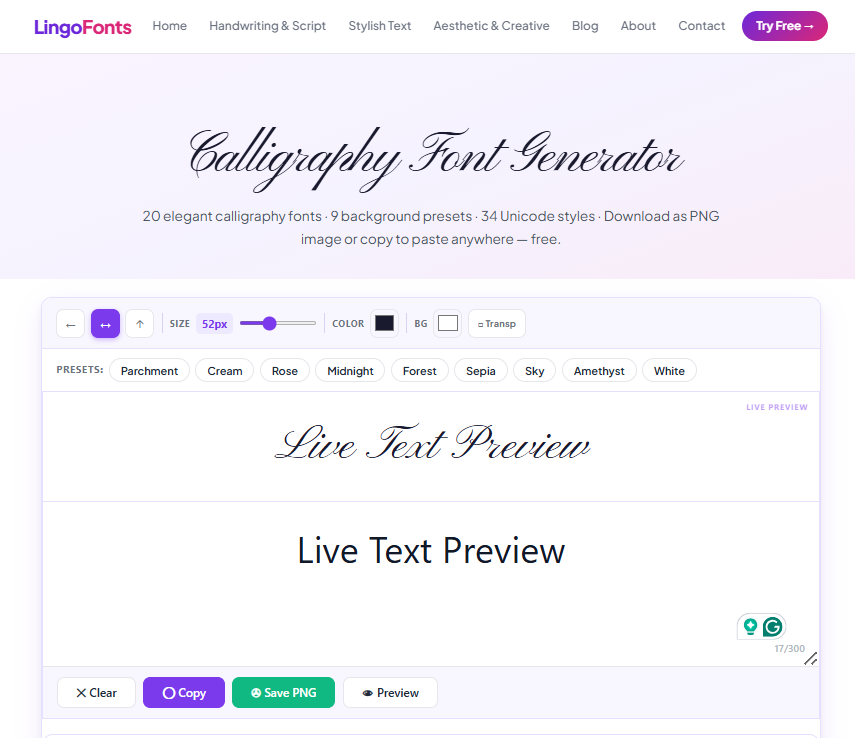
- Open the Calligraphy Font Generator and type the exact text, for example the couple’s names.
- Scroll through the real calligraphy fonts; every style updates live with your text.
- Choose a background preset. Cream, Parchment and White suit most printed suites; Midnight and Forest suit dark or moody designs.
- Adjust the size and text color, then download the result as a PNG.
- Place the PNG in your invitation design and print a test copy at actual size before ordering the full run.
Check the download at the size it will actually be printed. Most print shops ask for high-resolution artwork, so if the lettering looks soft when you zoom in, increase the size in the generator and export again.
Using Unicode Calligraphy for Digital Wedding Text
The 34 Unicode styles are what you want for anything you type. They paste straight into a wedding website builder, an Instagram announcement, a WhatsApp group invite or a Facebook event title, with no image needed.
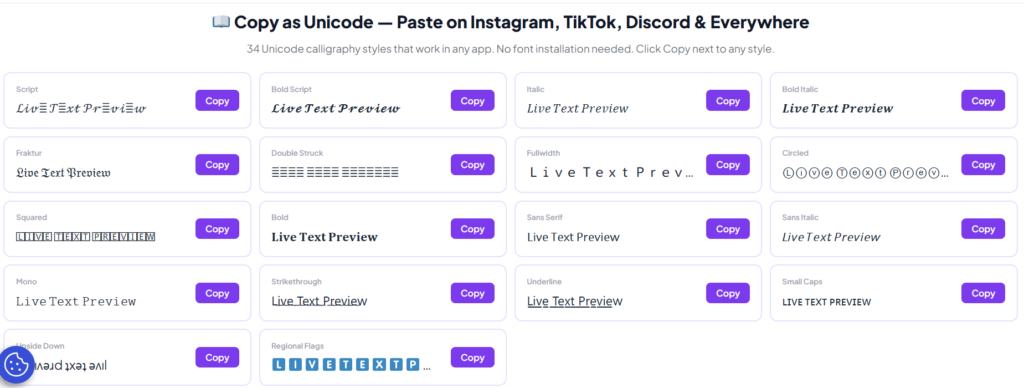
Three things to know before you use them:
- Hashtags won’t link. Styled letters are different characters from normal ones, so a styled wedding hashtag won’t match the plain version your guests type. Keep the hashtag itself in plain text.
- Screen readers struggle. Some screen readers spell styled characters out one by one or skip them. WebAIM recommends keeping important text in real, readable fonts, so never put the date, venue or RSVP deadline in Unicode styles.
- Some devices show boxes. Older phones may lack the symbols for less common styles. If a guest says your message looks like squares, see why fancy text looks like boxes.
Readability Rules for Wedding Calligraphy
- Never set script in all capitals; script capitals are designed to sit next to lowercase letters, and a row of them is very hard to read.
- Use script for names and short headings only, never for whole sentences.
- Keep strong contrast between letters and background, especially on light shimmer paper or dark cardstock.
- Light, slim scripts need more size than bold ones to read at the same distance.
- Always print one test copy at actual size before ordering.
Related Guides
If you’re deciding between a flowing handwritten look and true calligraphy, read Cursive vs. Calligraphy: What’s the Real Difference?. For monograms or a signature-style version of your names, try the Calligraphy Name Generator.
Frequently Asked Questions
What is the best calligraphy font for wedding invitations?
There isn’t one best font; it depends on the wedding’s style. Pinyon Script and Petit Formal Script suit formal weddings, Great Vibes and Allura suit romantic ones, and Marck Script suits casual or rustic weddings. Whichever you choose, use it for names and headings and keep the details in plain type.
Can I use these fonts on printed wedding invitations?
Yes. The 28 real calligraphy fonts in the generator are Google Fonts, which are open source and free for personal and commercial use. Download your lettering as a PNG and place it in your invitation design.
Should I use Unicode calligraphy text for my wedding hashtag?
No. Styled Unicode letters are different characters from normal letters, so a styled hashtag won’t match the plain version guests type. Write the hashtag in plain text and style the caption around it instead.
Can I use the lettering in Canva?
Yes. Upload the downloaded PNG as an image. Pasting Unicode styles into Canva text boxes may show missing-character boxes depending on the font selected, so the PNG route is more reliable for designs.
Is the calligraphy font generator free?
Yes. It’s free to use with no sign-up and nothing to install.
Try These Other Free Font Generators
- Cursive Generator: flowing, handwriting-style fonts
- Aesthetic Font Generator: trendy styles for TikTok, Instagram and Discord
- Bold Text Generator: bold Unicode text for emphasis
- Fancy Text Generator: decorative and symbol-rich styles