To find fonts by mood instead of by name, start from words that describe the feeling you want, such as elegant, cute, spooky or retro, and search font libraries that are tagged by those words. Google Fonts and Adobe Fonts both let you filter by mood-style tags, Fonts In Use shows real designs by style, and Identifont narrows fonts down by what the letters look like. Below you will find a mood-to-font cheat sheet, seven ways to search, and how to test a font’s feel with your own words in our free Aesthetic Font Generator.
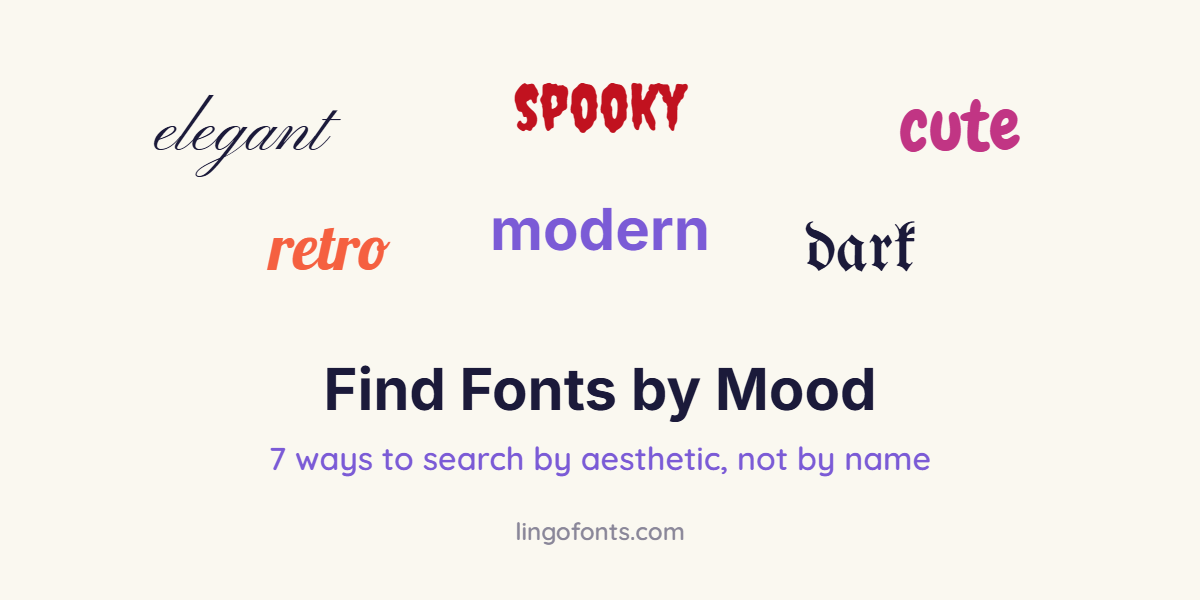
Mood-to-Font Cheat Sheet
Most moods map to a small set of typeface styles. Pick the row closest to your project, then try the example fonts.
| Mood you want | Typeface style | Free fonts to try | Preview it in |
|---|---|---|---|
| Elegant, romantic | Formal script, high-contrast serif | Pinyon Script, Allura, Playfair Display | Calligraphy Font Generator |
| Cute, playful | Rounded, bouncy letters | Chewy, Luckiest Guy | Hand Lettering Generator |
| Spooky, horror | Dripping or jagged display | Creepster, Nosifer, Eater | Gothic Text Generator |
| Dark, medieval, gothic | Blackletter (Old English) | UnifrakturMaguntia, Pirata One, MedievalSharp | Gothic Text Generator |
| Retro, vintage | Mid-century sign script | Lobster, Grand Hotel, Oleo Script | Hand Lettering Generator |
| Handmade, friendly | Casual handwriting | Caveat, Kalam, Patrick Hand | Cursive Text Generator |
| Bold, confident | Heavy sans-serif or condensed caps | Heavy sans-serif and serif bold styles | Bold Text Generator |
| Soft, aesthetic | Light script, wide or small-caps text | Sacramento plus Unicode styles | Aesthetic Font Generator |
7 Ways to Find Fonts by Mood or Aesthetic
1. Filter Google Fonts by tags
Google Fonts lets you filter its free library by tag groups. According to the Google Fonts tagging guide, the groups include Feeling, Appearance, Calligraphy, Serif, Sans Serif, Technology and Seasonal. Start with Feeling for mood words, then narrow down by Appearance. Every result is free under open-source licences.
2. Search Adobe Fonts tags
If you have a Creative Cloud subscription, Adobe Fonts tags let you browse with descriptive words such as Friendly, Rough or Futuristic. You can rate whether a font fits a tag, which improves the results over time.
3. Browse real designs on Fonts In Use
Fonts In Use is an archive of typography in real projects: posters, packaging, album covers and websites. Instead of guessing what “cosy” or “luxury” looks like, find a design with the feel you want and note which fonts it uses.
4. Describe the letters on Identifont
Identifont asks you questions about the shapes you have in mind, such as the tail of the Q or the style of the serifs, and suggests matching fonts. It is useful when you can picture a look but cannot name it.
5. Start from a picture that has the vibe
If you have a screenshot, logo or poster with the right mood, upload it to an image font identifier such as WhatTheFont. You will get the font or close matches, which you can then search for free alternatives.
6. Use generators grouped by style
Our generators group fonts by feel rather than alphabetically. The Gothic Text Generator has Halloween Horror, Old English, Medieval and Metal filters; the Hand Lettering Generator has Brush Script, Marker, Retro Sign and Chalk filters; and the Aesthetic Font Generator sorts copy-and-paste styles into Vaporwave, Cute and Kawaii, Gothic and Dark, Bold and Italic, and Symbols. Type your own words and compare every style at once.
7. Build a mood board of words first
Write three adjectives for your project before you search, for example “warm, handmade, calm”. Search each word separately, keep fonts that appear for at least two of them, and drop the rest. This stops you choosing a font only because it looks good on its own.
Words That Describe a Font’s Mood
Font libraries and designers use these terms. Knowing them makes searches far more precise:
- Contrast: the difference between thick and thin strokes. High contrast feels elegant; low contrast feels sturdy and friendly.
- Terminals: the ends of strokes. Rounded terminals feel soft and cute; sharp ones feel serious or edgy.
- x-height: the height of lowercase letters. A large x-height feels open and modern; a small one feels classic.
- Slant and flow: slanted, connected letters feel personal and romantic; upright, separate letters feel calm and clear.
- Weight: heavy fonts feel loud and confident; light fonts feel delicate and premium.
- Width: condensed fonts feel urgent and tall; wide fonts feel relaxed and spacious.
How to Test Whether a Font Has the Right Mood
- Preview it with your real words, not the sample sentence. A font that looks dreamy in “Lorem ipsum” can look childish in your brand name.
- Check it small and large. Mood fonts often lose their character, or become unreadable, at small sizes.
- Try it on your real background colour. Dark backgrounds make most fonts feel more dramatic.
- Pair it with a plain font for body text. One expressive font per design is usually enough.
- Read it out loud to someone else and ask what feeling it gives. If they name your mood, you have found it.
For social media, where apps do not let you change the font, mood comes from Unicode styles instead. See cute fonts for kawaii styles, Halloween fonts for spooky ones and what aesthetic fonts are for the soft, minimal look.
Frequently Asked Questions
How do I find fonts by aesthetic or mood rather than by name?
Describe the mood with adjectives such as elegant, cute or spooky, then search font libraries that support tags, such as Google Fonts (Feeling and Appearance filters) or Adobe Fonts. Fonts In Use and Identifont help when you can picture the look but not name it.
Can I search Google Fonts by mood?
Yes. Google Fonts groups tags into categories including Feeling, Appearance, Calligraphy, Serif, Sans Serif, Technology and Seasonal, so you can filter by the feeling you want.
What font style looks elegant?
Formal scripts and high-contrast serifs look elegant. Free examples include Pinyon Script, Allura and Playfair Display.
What font style looks cute?
Rounded, bouncy fonts with soft stroke ends look cute. Free examples include Chewy and Luckiest Guy. For social media, use Unicode styles such as bubble letters and small caps.
How do I find a font from a picture?
Upload the image to a font identifier such as WhatTheFont. It suggests the font or close matches, and you can then look for free alternatives with a similar mood.
How do I make sure a font fits my brand’s mood?
Write three adjectives for your brand, test the font with your real name and colours, check it at small sizes and pair it with a plain body font.